LAB 7
In today’s lab, we will learn about set operations and how to route to different pages in Flask.
Let’s recreate ClubA and ClubB tables in DBeaver.
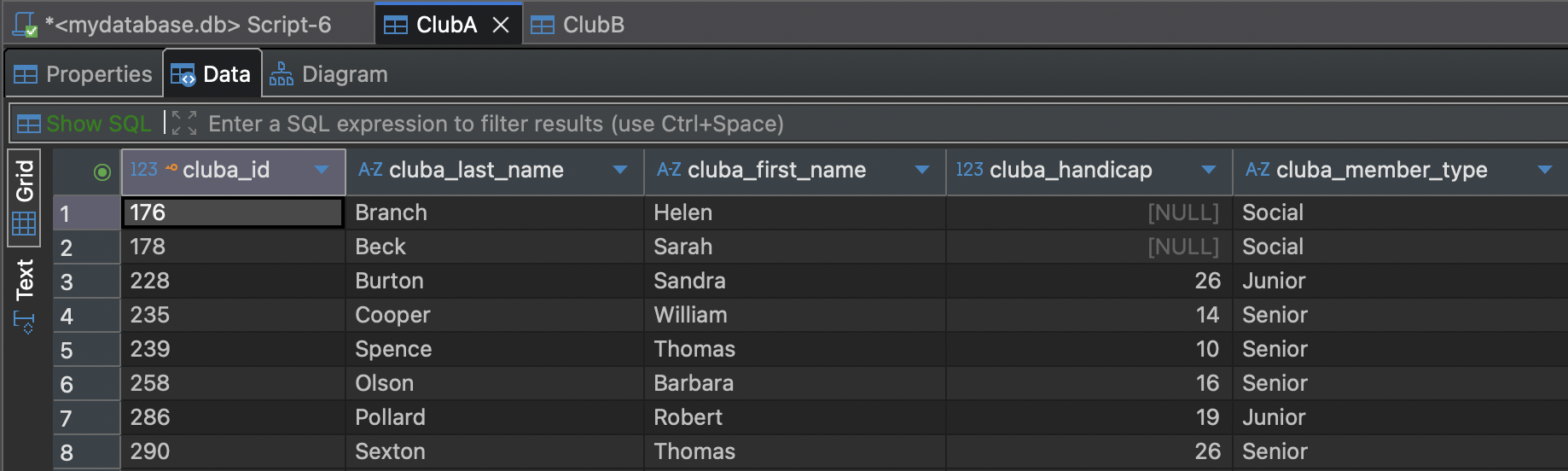
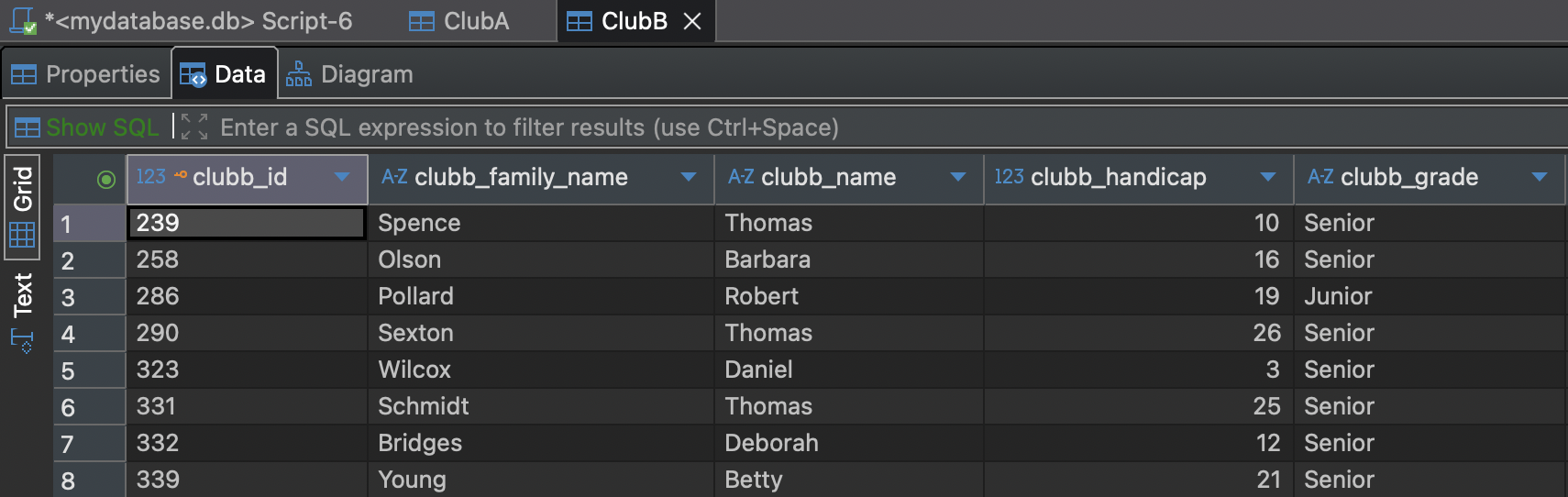
Home page set up
Let’s set up the home page to link to other pages. We will use the same folder that we used in Lab 6 and modify app.py.
import os
import sqlite3
from flask import Flask, render_template

app = Flask(__name__)

BASE_DIR = os.path.dirname(os.path.abspath(__file__))
DB_PATH = os.path.join(BASE_DIR, "mydatabase.db")

@app.route("/")
def home(): # instead of selfjoin, let's call it home
    return render_template("home.html")
    # we are not passing data, so we don't need the rows==rows

if __name__ == "__main__":
    app.run(debug=True)
We also need an HTML file for the home page, so create home.html inside the templates folder with the following code:
<!DOCTYPE html>
<html>
<head>
    <title>Set Operations</title>
</head>
<body>
    <h1>Set Operations</h1>

</body>
</html>
UNION
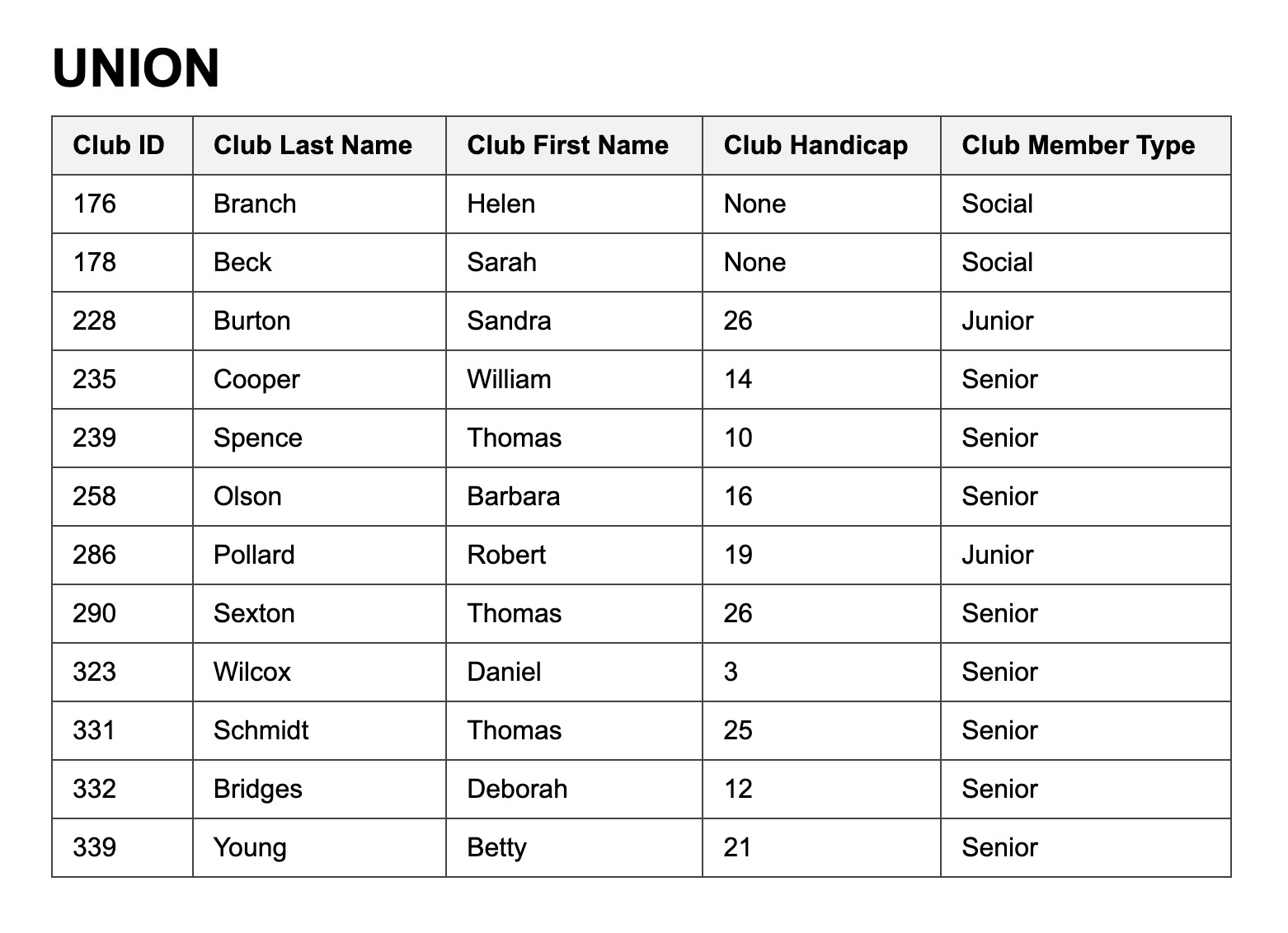
The union allows us to produce output consisting of all the unique rows from two union-compatible sets of rows. The query do so is the following.
SELECT * FROM ClubA
UNION
SELECT * FROM ClubB;
Instead of routing this to the main/home page, we want a separate page for the UNION operation.
@app.route("/")
Therefore, we will add “union” after the slash as follows
@app.route("/union")
The app.py file should look like the following
import os
import sqlite3
from flask import Flask, render_template

app = Flask(__name__)

BASE_DIR = os.path.dirname(os.path.abspath(__file__))
DB_PATH = os.path.join(BASE_DIR, "mydatabase.db")

@app.route("/")
def home(): # instead of selfjoin, let's call it home
    return render_template("home.html")
    # we are not passing data, so we don't need the rows==rows

@app.route("/union") #routes union and not the home page
def union():
    # connect it to the database
    with sqlite3.connect(DB_PATH) as conn:
        conn.row_factory = sqlite3.Row
        cur = conn.cursor()
        #execute query
        cur.execute("""
            SELECT * FROM ClubA
            UNION
            SELECT * FROM ClubB;
        """)
        rows = cur.fetchall() #fetch the data
    # returns the data to the template
    return render_template("union.html", rows=rows)

if __name__ == "__main__":
    app.run(debug=True)
We also cannot have only one HTML file for different pages, so create one specifically for this operation inside the templates folder.
This is how your Flask folder should look like:
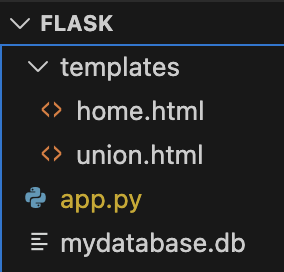
Let’s add the following code for the union.html file:
<!DOCTYPE html>
<html lang="en">
<head>
    <meta charset="UTF-8">
    <title>Lab 7</title>
    <style>
        body {
            font-family: Arial, sans-serif;
            margin: 40px;
        }

        h1 {
            margin-bottom: 10px;
        }

        table {
            border-collapse: collapse;
            width: 50%;
        }

        th, td {
            border: 1px solid #444;
            padding: 8px 12px;
            text-align: left;
        }

        th {
            background-color: #f2f2f2;
        }
    </style>
</head>
<body>
    <h1>UNION</h1>
    <table>
        <tr>
            <th>Club ID</th>
            <th>Club Last Name</th>
            <th>Club First Name</th>
            <th>Club Handicap</th>
            <th>Club Member Type</th>
        </tr>

        {% for row in rows %}
        <tr>
            <td>{{ row["cluba_id"] }}</td>
            <td>{{ row["cluba_last_name"] }}</td>
            <td>{{ row["cluba_first_name"] }}</td>
            <td>{{ row["cluba_handicap"] }}</td>
            <td>{{ row["cluba_member_type"] }}</td>
        </tr>
        {% endfor %}
    </table>

</body>
</html>
*For simplicity, we will use the same format as previous labs, but you may modify the format however you like
To route from one page to another, we need a button or link. Add the following below the header in the home.html file:
<ul>
        <li><a href="">Union Operation</a></li>
</ul>
When the user clicks that link, Flask looks for the @app.route associated with def union():.
Run the application with the following command in the terminal:
python app.py
You should see
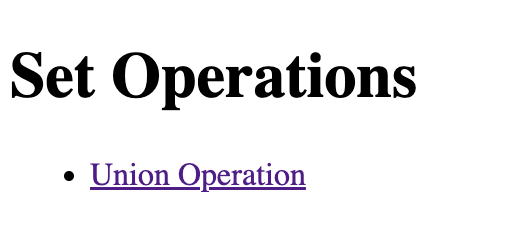
When you click the link, you should see the following table
INTERSECTION
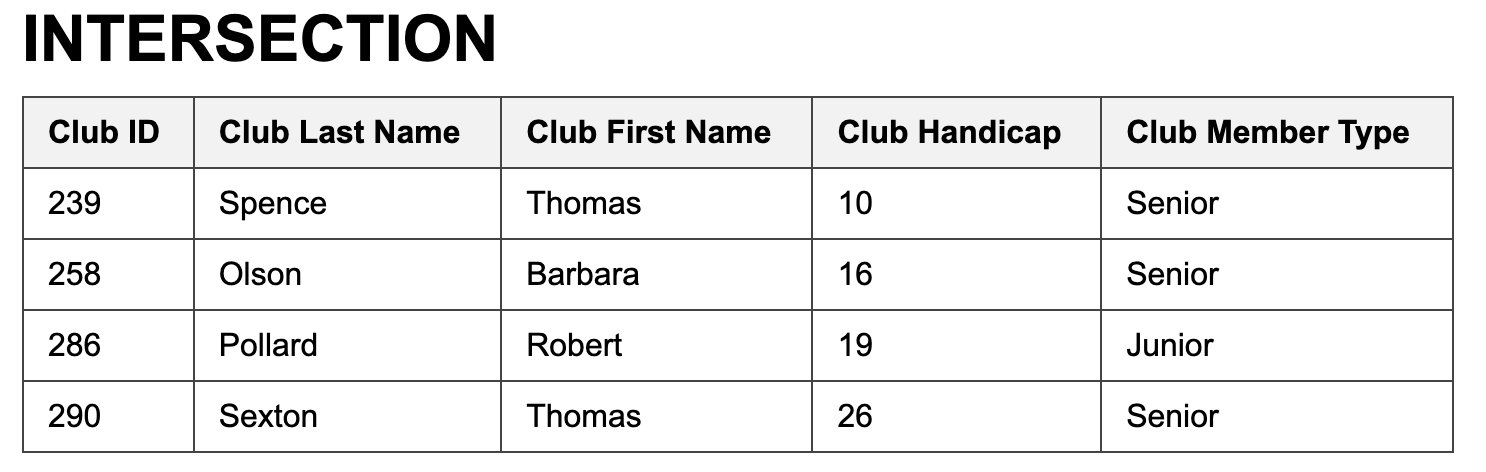
If you take the intersection of two union-compatible tables, you will retrieve those rows that are found in
both tables.
The keyword for the intersection operator in SQL is INTERSECT.
SELECT * FROM ClubA
INTERSECT
SELECT * FROM ClubB;
It is your turn to implement this. Remember the following:
Route to “intersection” instead of leaving the slash empty (which routes to the home page).
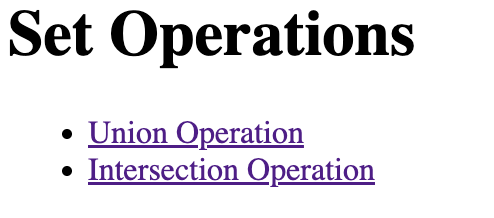
Add the URL link in home.html.
You should see the following on the home page:
When you click on the intersection link, you should see the following table
DIFFERENCE
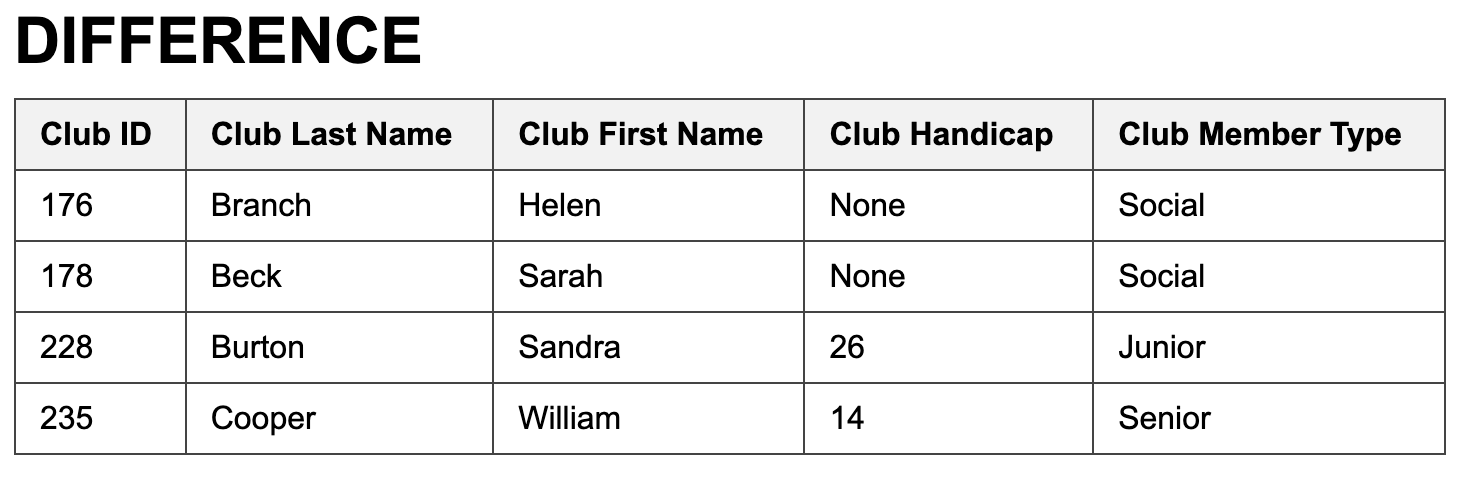
Taking the difference between two tables finds those rows that are in the first table but not the second and
vice versa.
The SQL for finding the names of people in the ClubA table that do not appear in the ClubB table is:
SELECT * FROM ClubA
EXCEPT
SELECT * FROM ClubB;
Should display the following table
DIVISION
The division operation helps with queries containing the words every or all. Current versions of SQL do not directly support division.
Let’s insert the same data into DBeaver from Lab 5 using the following SQL script:
-- foreign key enforcement
PRAGMA foreign_keys = ON;

-- clean tables
DROP TABLE IF EXISTS Tournament;
DROP TABLE IF EXISTS Entry;
DROP TABLE IF EXISTS Member;

CREATE TABLE Member (
    member_id INTEGER PRIMARY KEY,
    member_last_name TEXT,
    member_first_name TEXT
);

INSERT INTO Member (member_id, member_last_name, member_first_name) VALUES
(118, 'McKenzie', 'Melissa'),
(138, 'Stone', 'Michael'),
(153, 'Nolan', 'Brenda'),
(176, 'Branch', 'Helen'),
(178, 'Beck', 'Sarah'),
(228, 'Burton', 'Sandra'),
(235, 'Cooper', 'William'),
(239, 'Spence', 'Thomas'),
(258, 'Olson', 'Barbara'),
(286, 'Pollard', 'Robert'),
(290, 'Sexton', 'Thomas'),
(323, 'Wilcox', 'Daniel'),
(331, 'Schmidt', 'Thomas'),
(332, 'Bridges', 'Deborah'),
(339, 'Young', 'Betty'),
(414, 'Gilmore', 'Jane'),
(415, 'Taylor', 'William'),
(461, 'Reed', 'Robert'),
(469, 'Willis', 'Carolyn'),
(487, 'Kent', 'Susan');

CREATE TABLE Entry (
    entry_member_id INTEGER,
    entry_tournament_id INTEGER,
    entry_year INTEGER
);

INSERT INTO Entry (entry_member_id, entry_tournament_id, entry_year) VALUES
(118, 24, 2014),
(228, 24, 2015),
(228, 25, 2015),
(228, 36, 2015),
(235, 38, 2013),
(235, 38, 2015),
(235, 40, 2014),
(235, 40, 2015),
(239, 25, 2015),
(239, 40, 2013),
(258, 24, 2014),
(258, 38, 2014),
(286, 24, 2013),
(286, 24, 2014),
(286, 24, 2015),
(415, 24, 2015),
(415, 25, 2013),
(415, 36, 2014),
(415, 36, 2015),
(415, 38, 2013),
(415, 38, 2015),
(415, 40, 2013),
(415, 40, 2014),
(415, 40, 2015);

CREATE TABLE Tournament (
    tournament_id INTEGER NOT NULL PRIMARY KEY,
    tournament_name TEXT(50) NOT NULL,
    tournament_type TEXT(20) NOT NULL
);

INSERT INTO Tournament (tournament_id, tournament_name, tournament_type)
VALUES
(24, 'Leeston', 'Social'),
(25, 'Kaiapoi', 'Social'),
(36, 'WestCoast', 'Open'),
(38, 'Canterbury', 'Open'),
(40, 'Otago', 'Open');

SELECT * FROM Tournament;
SELECT * FROM Entry;
SELECT * FROM Member;
The corresponding SQL code to return the first names and last names of the members who have entered every tournament
SELECT m.member_last_name, m.member_first_name
FROM Member m
WHERE NOT EXISTS (
    SELECT *
    FROM Tournament t
    WHERE NOT EXISTS (
        SELECT *
        FROM Entry e
        WHERE e.entry_member_id = m.member_id
          AND e.entry_tournament_id = t.tournament_id
    )
);
Your DIVISION operation function in app.py should look like this
@app.route("/division")
def division():
    with sqlite3.connect(DB_PATH) as conn:
        conn.row_factory = sqlite3.Row
        cur = conn.cursor()
        cur.execute("""
            SELECT m.member_last_name, m.member_first_name
            FROM Member m
            WHERE NOT EXISTS (
                SELECT *
                FROM Tournament t
                WHERE NOT EXISTS (
                    SELECT *
                    FROM Entry e
                    WHERE e.entry_member_id = m.member_id
                      AND e.entry_tournament_id = t.tournament_id
                )
            );
        """)
        rows = cur.fetchall()
    return render_template("division.html", rows=rows)
How many rows do you see in the division table?</summary>
Answer: You should see only one row, which means only one person has entered every tournament.

</details>