LAB 9
In today’s lab, we will learn about aggregate operations and window functions.
Let’s learn how to run queries in PythonAnywhere. First, open the console and open the database that we have(remember to cd to the correct folder which is mysite). Then, let’s modify the member table
DROP TABLE IF EXISTS Member;

CREATE TABLE Member (
    member_id         INTEGER PRIMARY KEY,
    member_last_name  VARCHAR(50) NOT NULL,
    member_first_name VARCHAR(50) NOT NULL,
    member_gender     CHAR(1) CHECK (member_gender IN ('M', 'F')),
    member_handicap   INTEGER,
    member_coach_id   INTEGER,
    FOREIGN KEY (member_coach_id) REFERENCES member (member_id)
);

INSERT INTO Member (
    member_id,
    member_last_name,
    member_first_name,
    member_gender,
    member_handicap,
    member_coach_id
)
VALUES
    (118, 'McKenzie', 'Melissa', 'F', 30, 153),
    (138, 'Stone', 'Michael', 'M', 30, NULL),
    (153, 'Nolan', 'Brenda', 'F', 11, NULL),
    (176, 'Branch', 'Helen', 'F', NULL, NULL),
    (178, 'Beck', 'Sarah', 'F', NULL, NULL),
    (228, 'Burton', 'Sandra', 'F', 26, 153),
    (235, 'Cooper', 'William', 'M', 14, 153),
    (239, 'Spence', 'Thomas', 'M', 10, NULL),
    (258, 'Olson', 'Barbara', 'F', 16, NULL),
    (286, 'Pollard', 'Robert', 'M', 19, 235),
    (290, 'Sexton', 'Thomas', 'M', 26, 235),
    (323, 'Wilcox', 'Daniel', 'M', 3, NULL),
    (331, 'Schmidt', 'Thomas', 'M', 25, 153),
    (332, 'Bridges', 'Deborah', 'F', 12, 235),
    (339, 'Young', 'Betty', 'F', 21, NULL),
    (414, 'Gilmore', 'Jane', 'F', 5, 153),
    (415, 'Taylor', 'William', 'M', 7, 235),
    (461, 'Reed', 'Robert', 'M', 3, 235),
    (469, 'Willis', 'Carolyn', 'F', 29, NULL),
    (487, 'Kent', 'Susan', 'F', NULL, NULL);
COUNT()
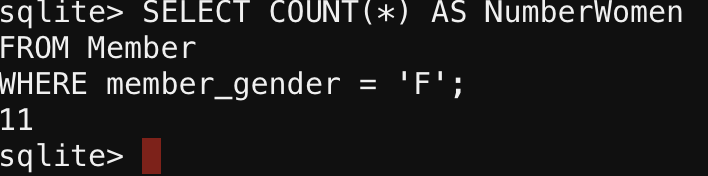
Let’s count the women in the Member table
SELECT COUNT(*) AS NumberWomen
FROM Member
WHERE member_gender = 'F';
You should see the following output
When we are performing the following
SELECT COUNT(*)
FROM Member
WHERE member_coach_id IS NOT NULL;
is the same as
SELECT COUNT(member_coach_id)
FROM Member;
both of them counts the non-null values in the member_coach_id column.
DISTINCT
“How many people have a coach?” and “How many coaches are there?” The
answer to the first question requires us to include all the values, which we did in the COUNT() section. We counted the amount of members that have a coach. The answer to the second question requires us just to count the distinct values.
In order to do that, we use the DISTINCT keyword as in the query here:
SELECT COUNT(DISTINCT member_coach_id)
FROM Member;
What’s the output?
AVG()
To find averages, we use the function AVG(). The parameter that goes in the parentheses (…), is the expression we want to average.
For example:
SELECT AVG(member_handicap)
FROM Member;
In other SQL engines such as SQL Server or PostgreSQL, you might have to multiply the value by 1.0 because they process the values as integers and not as floats/decimals. However, SQLite versions are smart and often handle AVG() as a floating-point operation automatically, but using * 1.0 is a “best practice” habit that prevents bugs when you switch to other databases like SQL Server or PostgreSQL.
SELECT AVG(member_handicap * 1.0)
FROM Member;
ROUND()
We use a rounding function to specify the number of decimal places we would like included in the output of AVG() and other expressions that result
in floating-point numbers.
SELECT ROUND(AVG(member_handicap * 1.0), 2)
FROM Member;
SUM(), MAX(), and MIN()
They are very straightforward to use. They are similar to the AVG() function.
SELECT MAX(member_handicap) AS maximum, MIN(member_handicap) AS minimum,
ROUND(AVG(member_handicap * 1.0),2) AS average
FROM Member;

GROUP
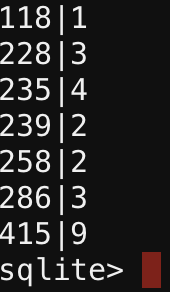
Grouping allows us to find the counts for all members using one SQL statement. The key phrase GROUP BY is used to do this.
The extra GROUP BY clause says, “Rather than just count all the rows in the Entry table, count all the subsets or groups with the same entry_member_id .”
SELECT COUNT(*) AS NumEntries
FROM Entry
GROUP BY entry_member_id;
It’s your turn to also print out the entry_member_id. It should look like the following:
Nested Queries and Aggregates
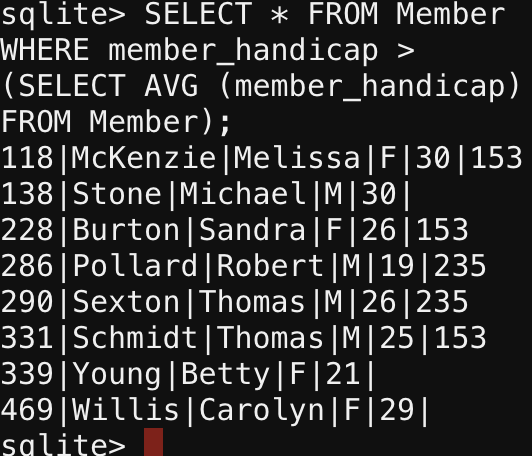
Nested Queries are SQL queries tucked inside another query, acting like a temporary data source or a filter for the “outer” main command. For example, we might want to find everyone with a handicap greater than the average handicap. Consider the following query:
SELECT * FROM Member
WHERE member_handicap >
(SELECT AVG (member_handicap)
FROM Member);
The inner part of the query returns the average handicap, and the outer part of the query compares the handicap of each member with that average.
Run the following query in your Bash console. What does it do?
SELECT AVG (NewTable.CountEntries) FROM
(SELECT MemberID, COUNT (*) AS CountEntries FROM Entry
GROUP BY MemberID)AS NewTable;